Esports World Cup 2024 Dashboard
An interactive Power BI dashboard on the Esports World Cup 2024 in Riyadh, built on data I scraped from Liquipedia with Python and validated by hand.
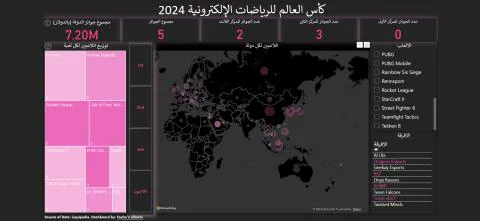
- Problem
- The Esports World Cup 2024 brought 1,500+ players, 200+ teams and 20+ games to Riyadh with a $60M prize pool, but there was no single view of who won what, by country, team and game.
- My role
- Solo, end to end, from data collection and cleaning to validation and the Power BI dashboard.
- Tools
- Python (web scraping), Power BI, Power Query, DAX
- Result
- A published dashboard with prizes and placements per country, a player map, and players and teams per game and country. Along the way I found and corrected counting errors in the source data.
The event
The Esports World Cup 2024 was held in Riyadh, organized by the Esports World Cup Foundation and the Saudi Esports Federation. It’s an annual event bringing together more than 1,500 players, 200+ esports teams and 20+ games, with a total prize pool of $60 million. Teams compete for the grand prize of $7 million, which Team Falcons won.
Collecting the data
The data comes from Liquipedia. To stay within its terms of use, I:
- Saved the web pages locally.
- Used Python to extract the data from those saved pages (scripts on GitHub).
Cleaning and validating
From the cleaned data I derived players per country, teams per game, prizes per team and prizes per country, then checked my numbers against the site’s own figures.
That check turned up calculation errors in the source: the site was counting only players listed with aliases. I traced the cause and used my own cleaned numbers instead.
Building the dashboard
The rest happened in Power BI, with DAX for most of the calculations. The dashboard shows:
- Prizes per country: first, second and third places, and prize money
- A map of players per country, and of first, second and third places per country
- Players per game and the countries they represent
- Teams and their players for each game and country
- Teams per country, based on where their players are from
Tip: pick the right ranking option to the left of the map. Hold Shift and click to select several countries, or Shift and drag across the map to select them all.